Film details,
written into your videos.
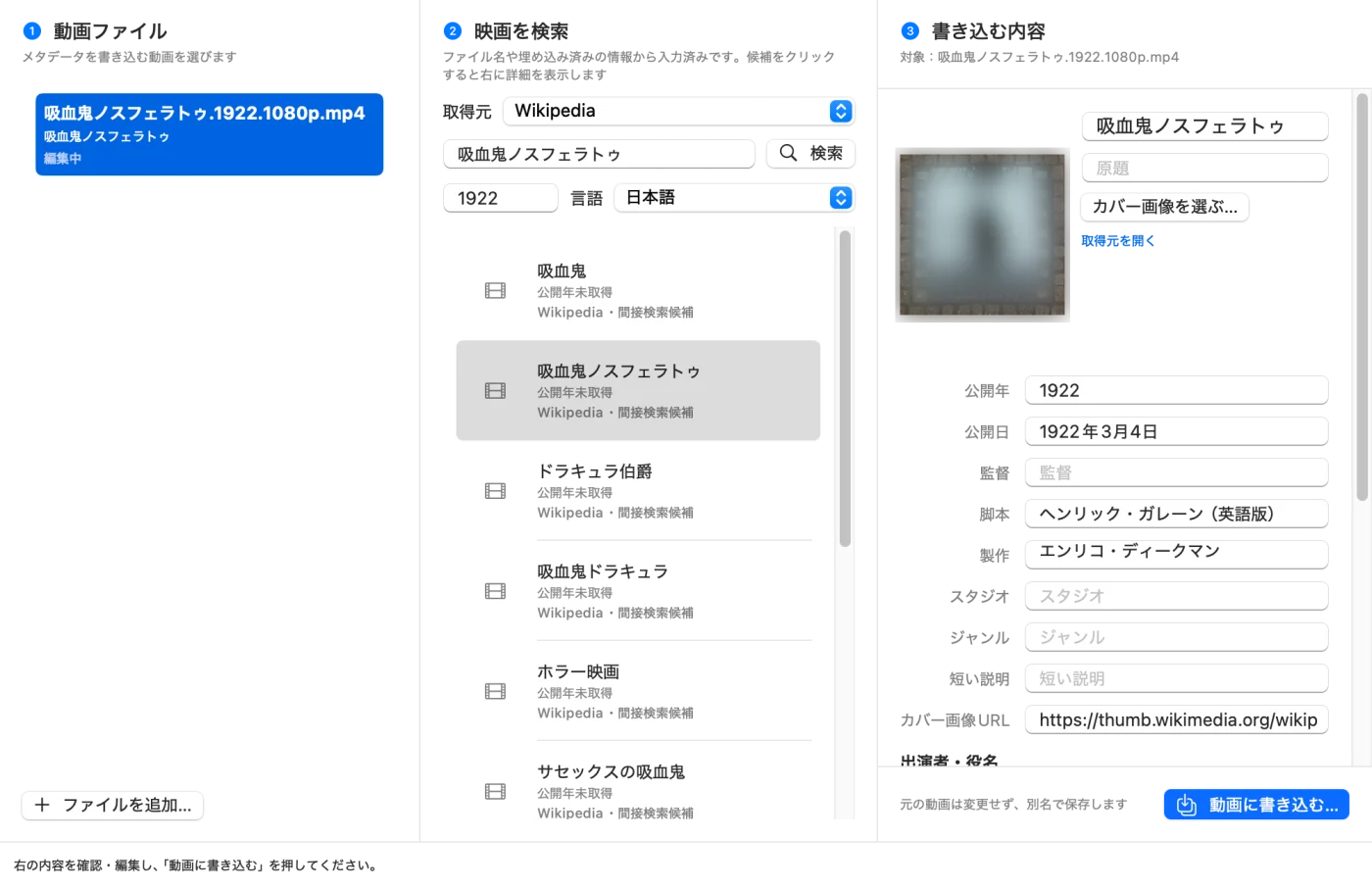
Open a video and Movie Metadata searches for the film or TV episode from its file name. Check the title, synopsis, cast, director and cover image of the work you pick, then save them into a new MP4. Video and audio are not re-encoded.
Movie Metadata has a Japanese interface only.
- Version 0.2.5
- 2.5 MB
- Notarized by Apple
- macOS 14 or later
- Apple silicon (M1 or later)
Things to check before you download
- Price
- FreeNo account, no ads. To use TMDB as a source, get your own free (non-commercial) TMDB API credentials
- Requirements
- macOS 14 or later, Apple silicon (M1 or later)Intel Macs are not supported
- App interface
- JapaneseThere is no English interface. TMDB can return film details in English
- Permissions
- NoneThe app reads only the videos you choose or drop on it
- Network
- Three situations onlyThe source you choose (search and details), the cover image's server (when writing) and the update check (k386.sub.jp, once a day, can be turned off). Your videos are never sent to K386
- Where data is kept
- On this Mac onlySaved MP4s and their JSON go where you choose; the TMDB token is kept in the macOS keychain
- Latest version
- 0.2.5 (November 16, 2026)Release notes
Features
Searches from the file name
Uses the embedded title and year, or the file name, dropping notes in brackets and tags like “1080p”. You can edit the query, year and source and search again.
Eleven sources
TMDB, Prime Video, Hulu, Netflix, U-NEXT, Disney+, Apple TV+, Eiga.com, TVer, ABEMA and Wikipedia. TMDB uses its official API; the others are read from public web pages.
Check and edit before writing
Title, original title, year, release date, director, writer, producer, studio, genre, cast with roles and synopsis — all editable. You can also pick your own cover image.
No re-encoding
Video and audio are copied as they are, so quality does not change. Save a new MP4 and keep the original, or overwrite the original file in place.
Verified after saving
The saved file is read back to check the title, cover, duration and track layout before it is put where you chose.
TV recordings
File names with a broadcast date or episode number are treated as TV recordings and searched on TVer for the programme, episode, air date and synopsis.
Limits
- Writes MP4 only; reads MP4, M4V and MOV. It does not download videos.
- You decide whether a candidate is the right work. Sources other than TMDB may stop working when their sites change.
- Cover images and synopses belong to their sources; being able to fetch them does not grant permission to reuse them.
- One file is written at a time. Intel Macs and macOS 13 or earlier are not supported.
Network and data
Movie Metadata connects to the network in these three situations only. Your videos, what you write, usage statistics and error reports are never sent to K386.
| When | Where | What is sent | Can it be turned off? |
|---|---|---|---|
| Searching and choosing a candidate | The source you choose (some go through Wikipedia, Wikidata or Eiga.com) | The search words (film or programme name), year and language, and requests for the work's page; your TMDB token for TMDB. Opening a video starts a search with words taken from its file name | No search, no traffic |
| Writing to a video | The server of the cover image | A request for the cover image only | Clear the cover field or pick a local image |
| Update check (once a day) | k386.sub.jp | Fetches version information; downloads the DMG when there is a new version | Yes, from the app menu |
FAQ
Why is it free?
It was made for personal use and is shared with other Mac users. There are no ads or paid upgrades.
Does it change my original video?
Not unless you choose to. By default the details go into a new MP4 with a different name. If you choose “元のファイルに上書き” (overwrite the original), the original is replaced and cannot be restored. An M4V original is saved as an MP4 with the same name and the M4V is removed. MOV files are never overwritten. Video and audio are not re-encoded.
How do I use TMDB?
Create a TMDB account, get an API Read Access Token on the API settings page (free for non-commercial use), and paste it into “TMDBの設定…” in the gear menu at the top right of the app.
Does it work on Intel Macs or macOS 13?
No. It needs an Apple silicon Mac (M1 or later) with macOS 14 or later.
How do I update it?
Automatically. Once a day the app checks for a new version, downloads it in the background, verifies its SHA-256, Developer ID signature and Apple notarization, and swaps it in the next time you quit. It never restarts in the middle of writing a video.
How do I uninstall it?
Quit the app and delete “Movie Metadata” from the Applications folder. To remove the TMDB token, clear it in “TMDBの設定…” first.
Data sources

This product uses the TMDB API but is not endorsed or certified by TMDB. Film details and images come from the sources you choose.
Trademarks
- Apple, Mac, macOS, Apple silicon, Finder and Apple TV+ are trademarks of Apple Inc., registered in the U.S. and other countries and regions.
- Intel is a trademark of Intel Corporation or its subsidiaries. Prime Video is a trademark of Amazon.com, Inc. or its affiliates.
- Netflix is a trademark of Netflix, Inc.; Disney+ of Disney Enterprises, Inc.; U-NEXT of U-NEXT Co., Ltd.; TVer of TVer Inc.; ABEMA of AbemaTV, Inc.
- Wikipedia and Wikidata are trademarks of the Wikimedia Foundation, Inc. TMDB, Hulu, Eiga.com and Homebrew are trademarks of their respective owners.
- Other names are trademarks of their respective owners (™ and ® omitted). K386 and Movie Metadata are not affiliated with, endorsed or approved by these companies.