
Your remaining AI quota,
on your desktop.
Quota Desk shows the remaining usage limits of Codex, Claude, and Antigravity, and when they reset, in a widget on your Mac desktop. You no longer need to switch to a browser or terminal to check.
- Version 0.2.3
- 2.7 MB
- Notarized by Apple
- macOS 14 or later
- Apple silicon
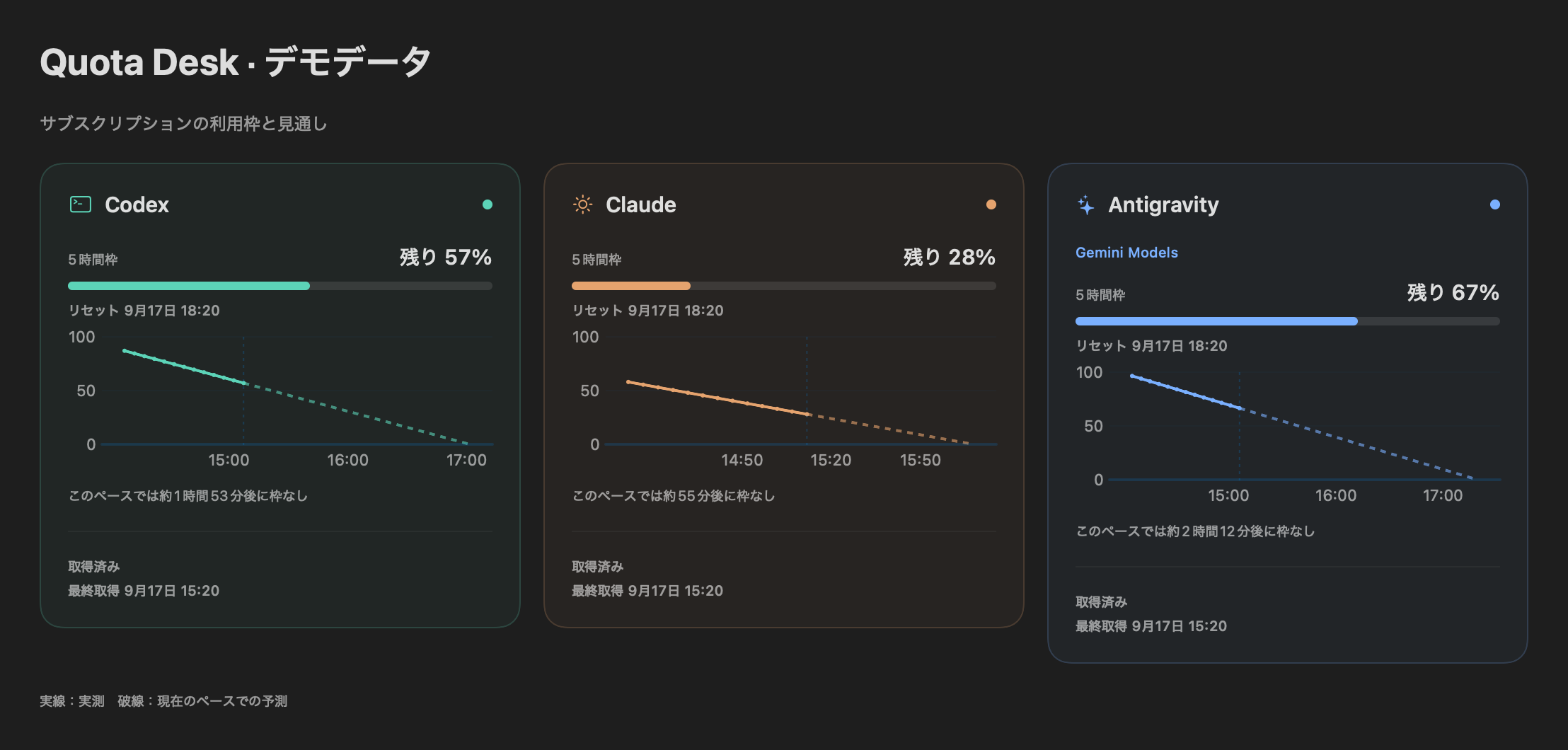
See what is left and when it resets, at a glance.

What to check before downloading
Cost, supported Macs, network access, and where your data is kept, all in one place.
Network access and data locations are listed here too.
- Cost
- FreeNo ads, no account, no paid tier
- Requirements
- macOS 14 or later, Apple siliconIntel Macs are not supported
- App interface
- JapaneseThe app screens are in Japanese only
- Permissions
- No Accessibility, Screen Recording, or Notification permissionsThe Claude terminal and Antigravity desktop integrations run only when you turn them on in Settings
- Network access
- AI services, claude.ai, k386.sub.jpQuota queries, Claude Web integration (only if used), update checks and downloads
- Where data is stored
- On this MacQuotas, history, and settings. Conversation text is not saved
- Latest version
- 0.2.3 (build 34)Released September 29, 2026
Made for people who
Have hit an AI usage limit in the middle of work
With the remaining share and reset time always visible, you can check your headroom before starting a long task.
Open a browser or terminal every time to check
A widget stays on your desktop, so the numbers are in view without switching windows.
Use Codex, Claude, and Antigravity side by side
Compare what is left on all three services in a single widget.
Features
The needle and number show the actual remaining quota that was retrieved. Forecasts are shown as forecasts, and unknown values are shown as unknown.
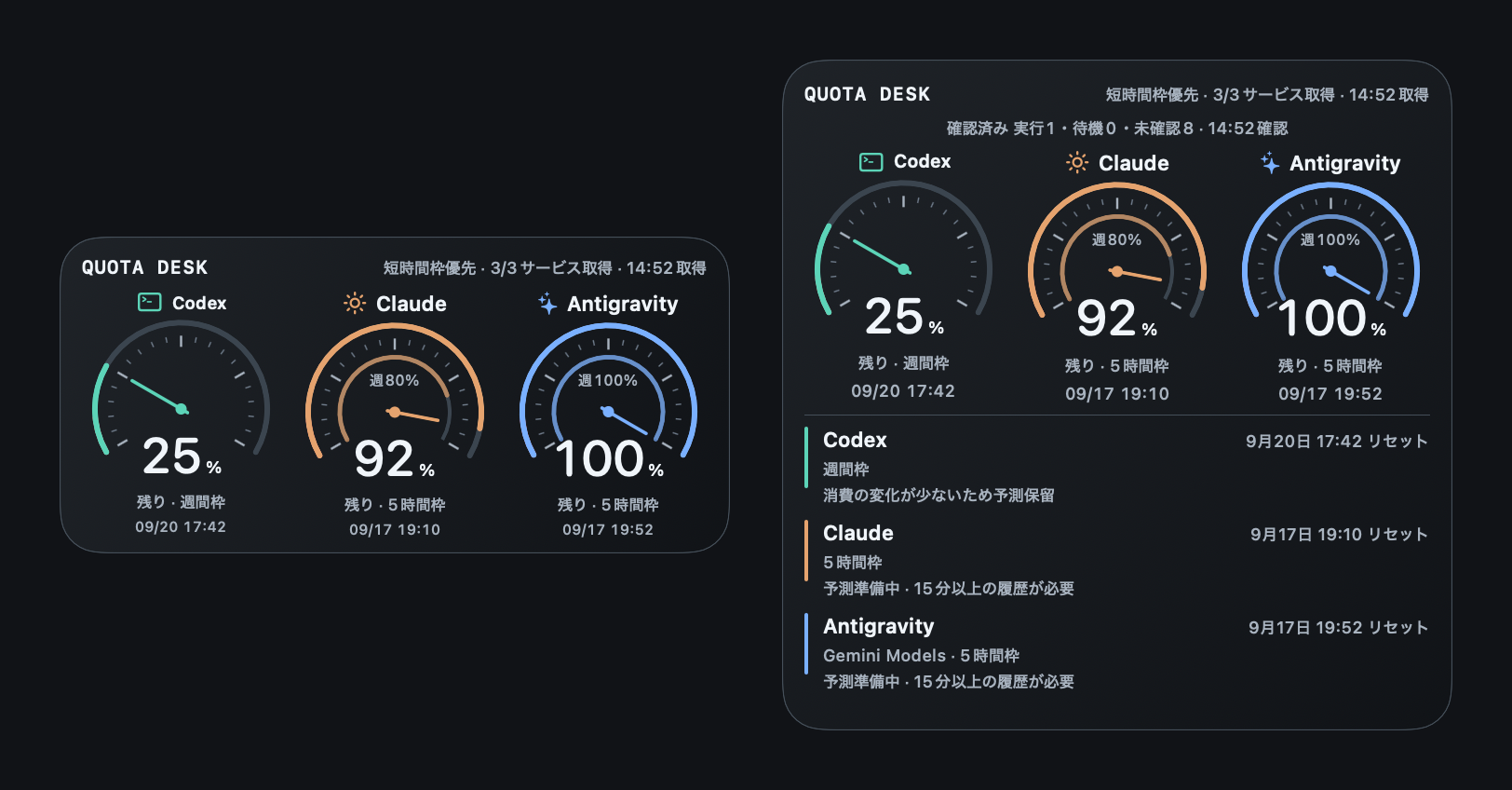
Remaining quota as a gauge
The needle and large number show the 5-hour quota first. If the same account also has a weekly quota, it appears as an inner ring with a weekly percentage. Services with only a weekly quota get a single ring.
Reset times
The next reset time for each service is shown under its gauge. If it cannot be retrieved, the gauge says so; after the time has passed, it shows that it is waiting for a new value.
Pace forecast
Only when there are at least 15 minutes and 4 points of history, Quota Desk shows where your current pace leads. The app draws a dashed line; the large widget marks the 1-hour forecast with a white ◇.
Unknown values show “—”
Missing values are never filled in with 0% or similar. No data shows “—”, and values older than 15 minutes are marked as previous readings. Quotas from different accounts or sources are never added together.
Per-conversation activity (experimental)
Lists the model and state (running, waiting, and so on) of conversations in Codex, Claude Code, and Antigravity, about every 10 seconds. Conversation text is not saved.
Widgets and menu bar
Widgets come in medium and large. There is a “triple gauge” widget for all three services and one widget per service. You can also open the app from the menu bar icon.
What it cannot do
- Remaining quotas and forecasts are reference values from the time they were retrieved. If a service changes how it works, retrieval may stop working. Before billing or other important decisions, also check each service’s official page.
- When you quit the app, periodic retrieval stops. Widgets keep showing the last retrieved values.
- macOS decides when widgets refresh, so they may lag slightly behind the app window.
- It cannot increase or save your quota.
- With the Claude terminal integration, values arrive when Claude Code finishes a response. Launching it alone does not show anything.
- It does not run on Intel Macs, iPhone, or iPad.
Getting started
Download and install
Open the DMG, move Quota Desk to your Applications folder, and launch it.
Connect your sources
Codex and Antigravity are detected automatically while they are running. For Claude, choose the Claude Web integration or, for the terminal version, “connect to the status line” in Settings.
Place the widget
Right-click the desktop, choose “Edit Widgets,” and add the Quota Desk triple-gauge widget in medium or large size.
Network access and data
Quota Desk connects to the network in only these three cases. It sends no usage telemetry. Quotas, history, and settings are stored on this Mac.
 Mei
MeiClaude Web integration connects only if you decide to use it.
| When | Where | What is sent | Can it be turned off? |
|---|---|---|---|
| Quota queries (every 5 minutes and when a service starts or stops) | Each AI service (through the official Codex and Antigravity tools on this Mac) | A request for quota information. It never sends questions to an AI to estimate usage | Deselect services you do not use under “services to show” in Settings |
| When you use Claude Web integration | claude.ai | Loads the usage page. Sign-in data stays in storage used only by this app | No connection unless you use it. “Disconnect Web integration” removes the sign-in data |
| Update checks (at launch and every 24 hours) and update downloads | k386.sub.jp (this site) | Fetches the update feed (appcast.xml). No system profile is sent | Turn off automatic checks in Settings |
The Claude terminal integration and the Antigravity desktop integration only exchange data within this Mac. For details, see the Privacy Policy & Disclaimer.
FAQ
Why is it free?
The developer built it for their own work and wants other Mac users to be able to use it too. There are no ads and no paid version.
Is this an official app from OpenAI, Anthropic, or Google?
No. It is made by the independent developer K386 and is not affiliated with those companies. Service names and trademarks belong to their respective owners.
Does checking the quota use up my AI usage?
It never sends questions to an AI to estimate usage. It only reads quota values from each service’s official tools or the Claude Code status line.
Is the app available in English?
No. The app interface is in Japanese. This English site explains how it works.
Does it work on Intel Macs?
No. It requires a Mac with Apple silicon (M1 or later) running macOS 14 or later.
How do I update?
From 0.2.0, the app tells you when a new version is available. You can also use “check for updates” from the menu bar or Settings. Installation happens only when you choose it. Version 0.1.0 has no updater, so please reinstall from the download page.
How do I uninstall it?
If you connected Claude, first disconnect the terminal integration and the Web integration in Settings. Then move Quota Desk from your Applications folder to the Trash. Data locations are listed under Uninstalling.
Try Quota Desk
Free and notarized by Apple. For Macs with Apple silicon running macOS 14 or later. The app interface is in Japanese.
Trademarks
- Apple, Mac, macOS, iPhone, iPad and Finder are trademarks or registered trademarks of Apple Inc. in the U.S. and other countries and regions.
- Anthropic, Claude and Claude Code are trademarks of Anthropic.
- OpenAI, Codex and ChatGPT are trademarks or registered trademarks of OpenAI.
- Google, Antigravity and Google Analytics are trademarks of Google LLC.
- Intel is a trademark of Intel Corporation or its subsidiaries.
- Other company, product and service names on this site are trademarks or registered trademarks of their respective owners. ™ and ® marks are omitted in the text.
- K386 and Quota Desk are not affiliated with, endorsed or sponsored by any of the companies above.