
Clock in and out,
on schedule.
Clocks in and out of jinjer, a Japanese attendance service, at the morning and evening times you set. Skips weekends, Japanese holidays and planned days off, and keeps a log of every run.
- Version 1.8.1
- On the Chrome Web Store
- Google Chrome (Windows, Mac)
- Login stays inside Chrome
jinjer is a Japanese attendance service, and the settings screen, the download page and the user guide are all in Japanese. This page gives an English overview; the essentials are described below.
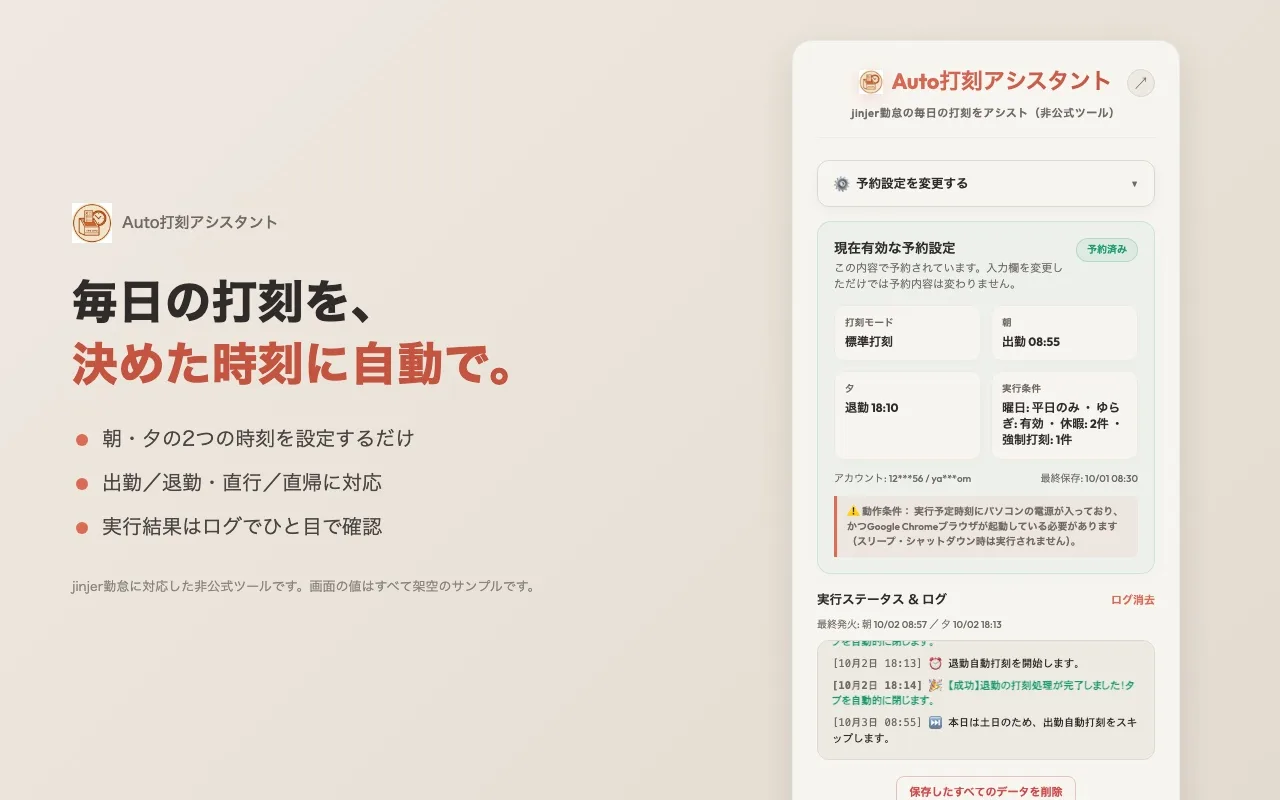
Pick a morning and an evening time, and Chrome does the rest.

Things to check first
Where it runs, what it talks to, and where your login is kept, in seven points.
Check first that automatic clocking is allowed at your workplace.
- Price
- FreeNo account needed. You use the jinjer account your employer gave you
- Requirements
- Google Chrome (Windows, Mac)Your computer must be on and Chrome running at the scheduled time. Other Chromium browsers are untested
- App interface
- JapaneseThe settings popup and the log are in Japanese
- Permissions
- Three onlyAlarms (to run at set times), storage (to keep settings in Chrome), and access to jinjer's site (
*.jinjer.biz). No other site is read or changed - Network
- Three destinations onlyjinjer (sign-in and clocking), Japanese public holiday data (weekdays-only mode), and Google Fonts for the popup. Nothing is sent to the developer
- Where data lives
- Inside Chrome on this computerCompany ID, employee number or email, password, schedule, days off and the run log are kept in
chrome.storage.local, never in Chrome sync. One button deletes everything - Latest version
- 1.8.1 (September 30, 2026)Release notes (Japanese)
Features
Built for one job: signing in to jinjer and pressing the clock button. It is not a general auto-click tool and does nothing on any other site.
Two scheduled times a day
Clock in (or "direct to site") at the morning time, clock out (or "direct home") at the evening time. Saving the settings registers the daily schedule in Chrome.
Pick the days
Every day, weekdays only (skipping weekends and Japanese holidays), or every day except Monday and Tuesday.
Days off and forced days
Register a day or a range as a day off and nothing is clocked. Register a "forced" day and it clocks in even on a weekend or holiday. Expired entries clean themselves up.
Jitter
Optionally delay each run by a random 0 to 5 minutes so the time is not identical every day. It never runs early.
Log and test buttons
See success, skip and error entries in the popup (last 50). Test buttons run the process right away without waiting for the schedule.
Catch-up on launch
If Chrome was closed at the scheduled time, it tries to make up the missed run when Chrome starts later the same day. Always check the result in jinjer.
What it cannot do
Nothing is clocked while the computer is asleep or off, while Chrome is closed, or if jinjer changes its pages. The developer cannot take responsibility for a missed punch (see the disclaimer, in Japanese).
- Works only with jinjer (
https://*.jinjer.biz/). No other attendance service is supported. - Cannot run on mobile Chrome, which does not support extensions.
- Do not use it if your workplace does not allow automatic clocking.
Getting started
The download page and user guide (both in Japanese) have the full steps with screenshots.
Add it from the Chrome Web Store
Open the store page (it is unlisted, so it will not show up in search) and click "Add to Chrome". A ZIP for manual loading is also available for environments that block the store.
Enter your account and times
Open the popup from the toolbar icon, fill in your jinjer company ID, employee number or email and password, choose the mode, the morning and evening times and the days, then press the save button (設定を保存して予約).
Let it run
At each time Chrome opens jinjer's sign-in page in a new tab, signs in, presses the button and closes the tab. The result is written to the log.
Network and data
The extension talks to three places only. Your login, settings and log are never sent to the developer or any third party. There is no telemetry and no advertising.
| When | Where | What is sent | Can it be turned off? |
|---|---|---|---|
| At the scheduled time, or when you press a test button | jinjer (https://kintai.jinjer.biz/) | Your company ID, employee number or email and password, typed into jinjer's own sign-in form | No, this is the purpose of the extension |
| Before a run in weekdays-only mode | Japanese holiday data (holidays-jp.github.io) | Nothing about you; it only fetches the holiday list | Yes, by choosing another day setting |
| When the popup opens | Google Fonts | Font files only, no settings | No (the popup still works offline) |
- Everything is stored in
chrome.storage.localon this computer, never in Chrome sync. The password is stored in plain form, so do not use the extension on a shared computer or profile. - The bottom button in the popup (保存したすべてのデータを削除) deletes all stored data and cancels the schedule. Removing the extension from Chrome deletes it too.
- The code is not obfuscated and loads no remote code.
FAQ
Does it run while my computer is asleep or off?
No. It runs inside Chrome, so the computer must be on and Chrome must be running (minimized or in the background is fine). If you start Chrome later the same day, it tries to catch up, but check the log.
Is this an official jinjer tool?
No. It is an unofficial tool with no relationship to jinjer Co., Ltd., and it may stop working if jinjer changes its pages.
How do I update or remove it?
Installed from the Chrome Web Store, it updates itself. A manually loaded ZIP does not; replace the folder and reload it on chrome://extensions. To remove it, click "Remove" on chrome://extensions; all stored data is deleted with it.
Why is it free?
It was built for the developer's own daily work and shared for anyone with the same problem. There are no ads and no paid version.
Get Auto打刻アシスタント
Version 1.8.1, released September 30, 2026. The download page (in Japanese) explains both the Chrome Web Store route and the manual ZIP route, with the ZIP's SHA-256.
Trademarks
- "jinjer" is a trademark or registered trademark of jinjer Co., Ltd. This tool is unofficial, has no relationship with the company, and is not endorsed or provided by it.
- Google Chrome, Chrome Web Store and Google Fonts are trademarks of Google LLC.
- Windows is a trademark or registered trademark of Microsoft Corporation in the United States and other countries.
- Apple, Mac and macOS are trademarks or registered trademarks of Apple Inc. in the U.S. and other countries.
- Other company, product and service names on this site are trademarks or registered trademarks of their respective owners. ™ and ® marks are omitted in the text.
- K386 and Auto打刻アシスタント are not affiliated with, endorsed by or sponsored by any of the companies above.